The Intake Bottleneck
The client — a mid-sized professional services firm handling hundreds of client submissions weekly — had outgrown manual intake. Staff spent hours each day copying information from inbound emails and PDF attachments into CRM and ERP records. Variations in document format made template-based OCR unreliable, and manual review introduced delays and transcription errors.
Operations manager Claire described the daily grind: "Every morning someone opened the intake mailbox and started copying fields from PDFs into Dynamics. Vendor invoices looked nothing like client onboarding forms, which looked nothing like compliance certificates. Same task, different layout, every single time."
Rework cycles from transcription errors cost an estimated 15 hours per week. Senior staff reviewed entries that should never have needed human touch.
The Automated Workflow
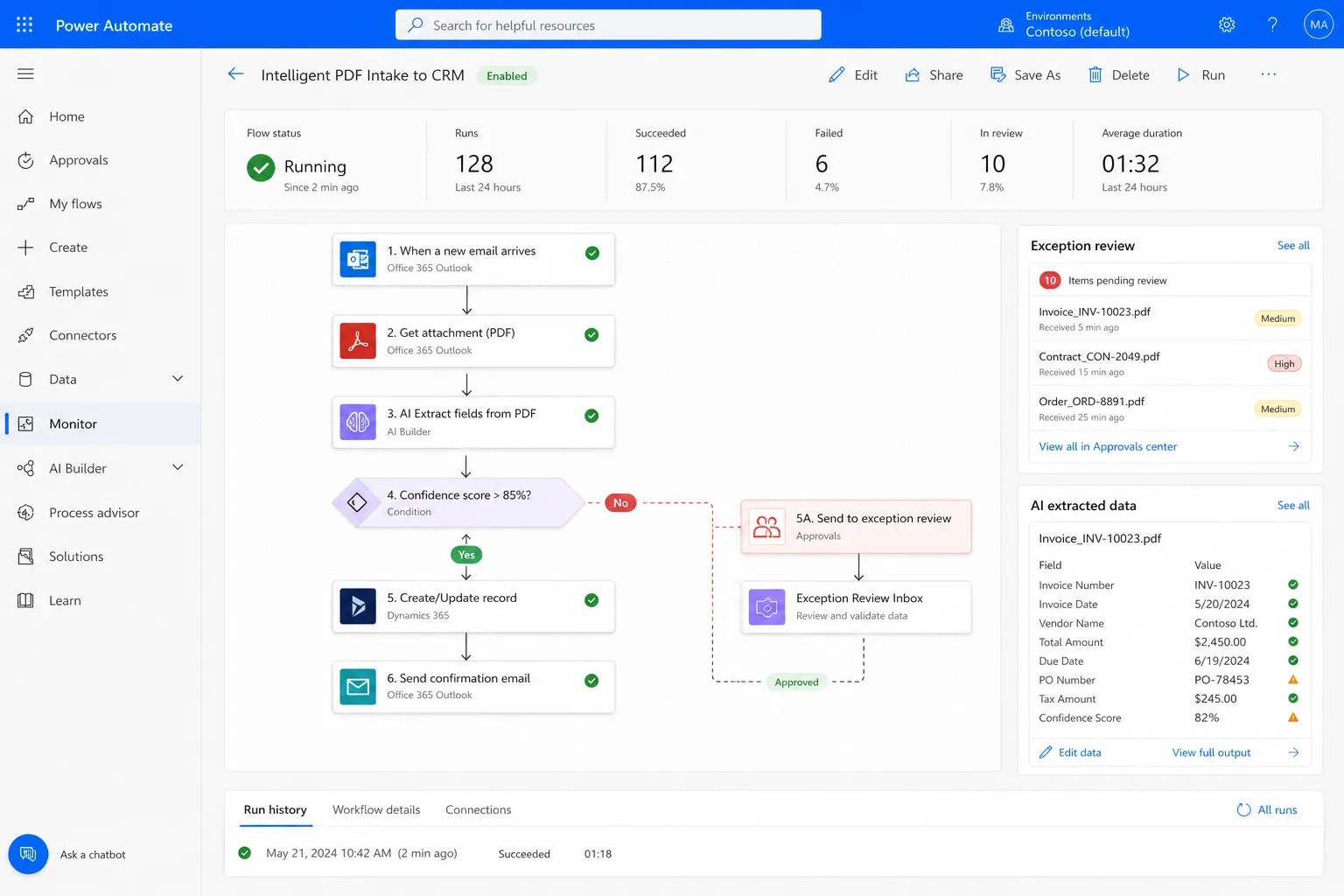
We built a Power Automate flow that:
- Monitors a dedicated intake mailbox for new messages and attachments
- Sends PDF and image content to Azure OpenAI for structured field extraction
- Validates extracted fields against business rules (required fields, format checks)
- Routes clean records into the core system; flags exceptions for human review
Exception handling keeps a human in the loop only when confidence scores fall below threshold — typically less than 5% of submissions.
| Workflow stage | Trigger | Action |
|---|---|---|
| Document intake | New email with attachment in intake mailbox | Classify document type (invoice, onboarding, compliance) |
| Field extraction | Classified PDF or image | Azure OpenAI extracts structured fields with confidence score |
| Validation | Extraction complete | Business rules check required fields, formats, duplicate detection |
| Auto-route | Confidence ≥ 90% | Create record in Dynamics/ERP with extracted data |
| Exception queue | Confidence < 90% or validation fail | Card in review inbox with extracted preview and edit fields |
Why Power Platform Over Custom Code
The client needed rapid deployment without a six-month custom build. Power Automate integrates natively with Microsoft 365 and their existing Dynamics environment. Azure OpenAI handles unstructured document variance that traditional OCR cannot.
A custom Python extraction pipeline was scoped at twelve weeks and ongoing maintenance. Power Automate delivery: four weeks from kickoff to production, with flows the client's IT team can inspect and modify without a developer on retainer.
Total project delivery: architecture, deployment, and handover documentation — no ongoing retainer required for day-to-day operation.
Exception Handling That Scales
The review inbox shows the original attachment alongside extracted fields. Staff correct mismatches and approve — resolution averages under 90 seconds per exception. Common correction patterns feed back into prompt tuning, improving auto-route rates over time.
After three months in production, auto-route rate climbed from 78% to 95% as the extraction prompts were refined against real document variance.
Results After Six Months
| Metric | Before | After 6 months |
|---|---|---|
| Manual data entry hours per month | ~240 | ~35 (exceptions only) |
| Data entry error rate | ~8% | <0.5% |
| Average intake-to-record time | 4–6 hours | <15 minutes (auto-route) |
| Admin FTE on intake tasks | 1.5 | 0.3 (redeployed to client-facing work) |
| Rework hours from transcription errors | ~15/week | ~1/week |
Claire: "We didn't replace people — we stopped paying skilled staff to be copy machines. The exceptions inbox is the only place anyone touches intake now, and it's a fraction of what we used to do."
What They Did Not Change
Staff kept their existing Dynamics environment and email infrastructure. The automation layer sits on top — monitoring the intake mailbox and posting structured records. No rip-and-replace of core systems, no migration of historical data beyond a forward-looking cutover date.
Engagement Model
Phased delivery over four weeks: intake workflow design (week 1), Azure OpenAI extraction configuration and testing (week 2), Power Automate flow build and Dynamics integration (week 3), hypercare and handover (week 4). Ongoing support on an hourly basis — no bloated MSP retainer.
This engagement sits within our Software, AI & Automation practice — business automation, AI workflows, and Microsoft ecosystem integration.