This guide walks through configuring OceanDMS as a compliance-ready document library for a mortgage brokerage — before enabling any workflow automation. Correct folder structure and metadata now saves hours of rework when you connect OceanFlow reminder packs later.
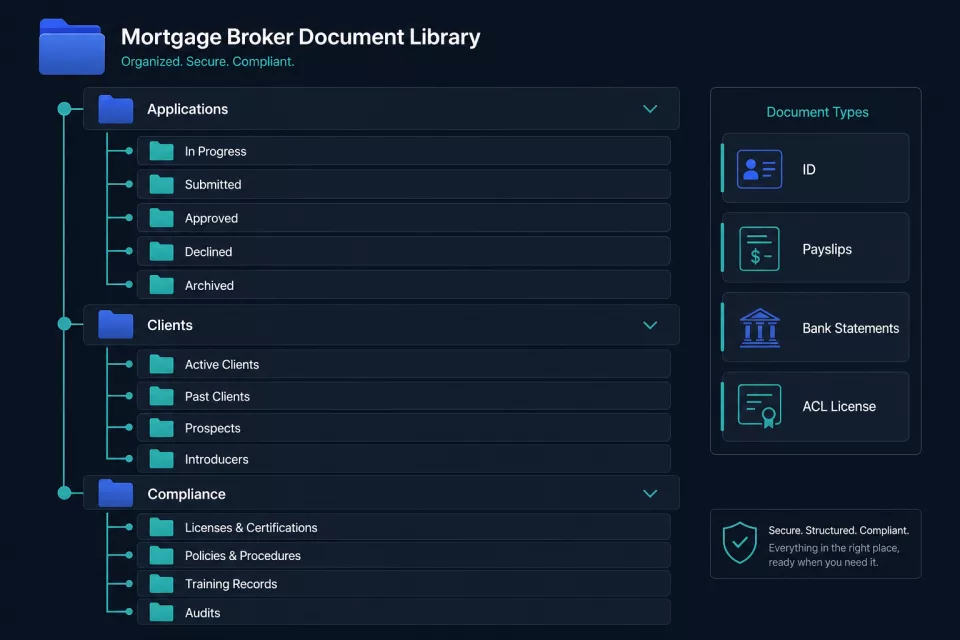
Recommended Folder Hierarchy
Create three root-level folders in OceanDMS. Each maps to a distinct document lifecycle:
Applications/
├── Active/
│   ├── Smith-J-2026-0142/          # Client surname + year + sequence
│   │   ├── Identity/
│   │   ├── Income/
│   │   ├── Assets/
│   │   ├── Liabilities/
│   │   └── Lender-Submission/
│   └── Nguyen-T-2026-0143/
├── Conditional/
│   └── ...
└── Settled/
    └── ...

Clients/
├── Smith-J/
│   ├── Historical-Applications/
│   └── Correspondence/
└── ...

Compliance/
├── Broker-Licenses/
├── PI-Insurance/
├── ACL-Registration/
└── CPD-Records/
Setup steps
- Open OceanDMS → Settings → Folder Templates (or create manually if templates are not yet enabled).
- Create root folders:
Applications,Clients,Compliance. - Under
Applications/Active, create a subfolder per open loan using the naming convention{Surname}-{Initial}-{Year}-{Sequence}. - Inside each application folder, create standard child folders:
Identity,Income,Assets,Liabilities,Lender-Submission. - When an application moves stage (pre-approval → conditional → settled), move the folder to the matching parent (
Active→Conditional→Settled) rather than renaming in place — this preserves audit history.
Document Types & Tagging
Apply tags at upload time so search and future automation can filter without opening folders.
| Tag | Applies to | Example documents |
|---|---|---|
id-document |
Identity folder | Driver licence, passport, Medicare card |
payslip |
Income folder | Last 2 payslips, PAYG summary |
bank-statement |
Income / Assets | 3 months transaction history |
credit-report |
Lender-Submission | Equifax / Illion report |
tax-return |
Income folder | Last 2 years individual or company returns |
broker-license |
Compliance | ASIC credit rep registration |
pi-insurance |
Compliance | Professional indemnity certificate |
acl-registration |
Compliance | Australian Credit Licence evidence |
Tagging rules
- Every uploaded document receives at least one type tag and one application tag (e.g.
app-2026-0142). - Compliance documents in the
Compliance/root receive acompliancetag plus the specific type (pi-insurance,acl-registration). - Do not rely on filename alone —
scan001.pdfshould never exist without tags.
Checklist Template per Application Stage
Define a checklist template for each stage. Admin marks items complete as documents arrive.
Pre-approval stage
| Item | Required tag | Notes |
|---|---|---|
| Photo ID (front + back) | id-document |
Must not be expired |
| Last 2 payslips | payslip |
Or 2 years tax returns if self-employed |
| 3 months bank statements | bank-statement |
All accounts declared on application |
| Privacy consent signed | privacy-consent |
Dated within 90 days |
| Fact find completed | fact-find |
Broker-signed copy |
Conditional approval stage
| Item | Required tag | Notes |
|---|---|---|
| Updated payslips (if >30 days) | payslip |
Refresh if pre-approval >30 days old |
| Property valuation report | valuation |
From approved panel valuer |
| Building insurance quote | insurance-quote |
If property identified |
| Conditions letter (signed) | conditions-letter |
Client acknowledgment |
Unconditional / settlement stage
| Item | Required tag | Notes |
|---|---|---|
| Final loan documents | loan-documents |
Lender-generated pack |
| Settlement statement | settlement-statement |
From conveyancer |
| Discharge authority (if refinance) | discharge-authority |
Existing lender |
Store the checklist as a pinned note or metadata field on the application folder. OceanFlow document-chase workflows reference missing tags against this template.
Expiry Metadata for Compliance Docs
Broker compliance documents expire. Track expiry at upload:
- Open each document in
Compliance/→ Edit metadata. - Set Expiry date field:
- PI Insurance — typically annual renewal
- ACL Registration — check ASIC register renewal date
- Broker ID / credit rep registration — per ASIC schedule
- CPD records — per accreditation year
- Set Reminder offset: 30 days before expiry (default; adjust to 45 for PI insurance if your insurer requires lead time).
- Enable Alert on expiry so OceanDMS flags the document in search results when within the reminder window.
| Document | Typical renewal | Recommended reminder |
|---|---|---|
| PI Insurance | 2 annual | 45 days |
| ACL Registration | Per ASIC | 60 days |
| Credit rep registration | Per ASIC | 30 days |
| CPD completion | Annual | 14 days |
Search & Retrieval Patterns for Admin Staff
Train admin on these search patterns before go-live:
Find all missing items for an application:
tag:app-2026-0142 NOT tag:payslip
List compliance docs expiring within 30 days:
folder:Compliance expiry:<30days
Find all active applications for a client:
folder:Applications/Active tag:client-smith-j
Natural-language search (if RAG enabled):
"Show me bank statements for Nguyen application"
Results are scoped to documents the user has access to — no cross-client leakage.
Pre-Go-Live Checklist
Before handing OceanDMS to broker admin staff:
- [ ] Three root folders created (
Applications,Clients,Compliance) - [ ] Application subfolder template applied (Identity, Income, Assets, Liabilities, Lender-Submission)
- [ ] All document type tags defined and documented in internal wiki
- [ ] Checklist templates saved for pre-approval, conditional, and unconditional stages
- [ ] Existing compliance certificates uploaded with expiry dates set
- [ ] At least one test application folder populated with sample documents and tags
- [ ] Admin staff trained on upload tagging and search patterns (30-minute session)
- [ ] Backup and retention policy confirmed with IT
Once this foundation is solid, enable OceanFlow Document Checklist Reminder and Compliance Expiry Alert workflow packs to automate the chase — see our case study on broker document automation for real-world results.
Questions about OceanDMS setup for your brokerage? Contact OceanSoft Solutions.